The path to automation with agentic AI tools
As using more and more AI tools, I do feel more confident to open an agent harness and assign tasks to it. Partly spend some time digging into the source codes of several popular open source projects(e.g. ponytail, caveman) and learning about how they actually work, more importantly, I am really surprised and impressed by the capabilities of those frontier models.
Name a few examples here. I got a great how-to guides on navigating on a web-ui with screenshots with annotations(bound boxings, arrows and texts showing where to click + sensitive content gets redacted) with a 4-sentence prompt. The agent controlled my browser to explore and follow my words and took screenshots and then wrote Python scripts for annotations. When goes for API testings, after reading the API Specs, the agent was able to generate hundreds of scripts to call the endpoints to try out many combinations of the payload and then presented a insightful report describing some corner cases that were not written from the doc. I don't even need to talk more about writing code, as I am amazed by those great outcomes from tasks that require reading multiple repos and the follow-up implementations.
Basic level
At this point, if aiming for high quality results, simply - well, maybe a bit too oversimplified, but you can get my point :) - two things are needed:
- Context. How can you expect the agent to achieve your goals without relevant info?
- Functional instructions. How to approach towards the goal, and this includes tool calls, skills, plugins that will become part of the input of the LLMs calls, no matter whether the agent can (ask to) use or not. Emphasizing functional here, which is very subjective - what works for you is functional, here is mine.
On that note, it relates to another thing I come up with recently - how to define the role and responsibilities of LLMs during AI agent development: info gathering and decison-making. Will put a new post once I've sorted out my thoughts on this.
Accomplishing satifying outcomes means that workflow being created works but can you call it automation? My answer was yes before, since I was able to quickly create lots of SKILLS.md, back by agent skills for it. However, as time goes by, I realized that I still need to activate those skills repeatedly, wait until they finished and sometimes follow back and forth. There should be a smarter way.
A bit further
There is. Cronjob is not a new feature harness provides. I heard about it long time ago alongside the term 'loop engingeering', plus with stuff like hooks. Muscle memories forms only after practices, in many times. Without even trying/using yourself, it is hard to actually understand how stuff works. That's how I think when I look back afterwards and once you manage to set up your first job, you won't hesitate to quickly set next ones for other use cases.
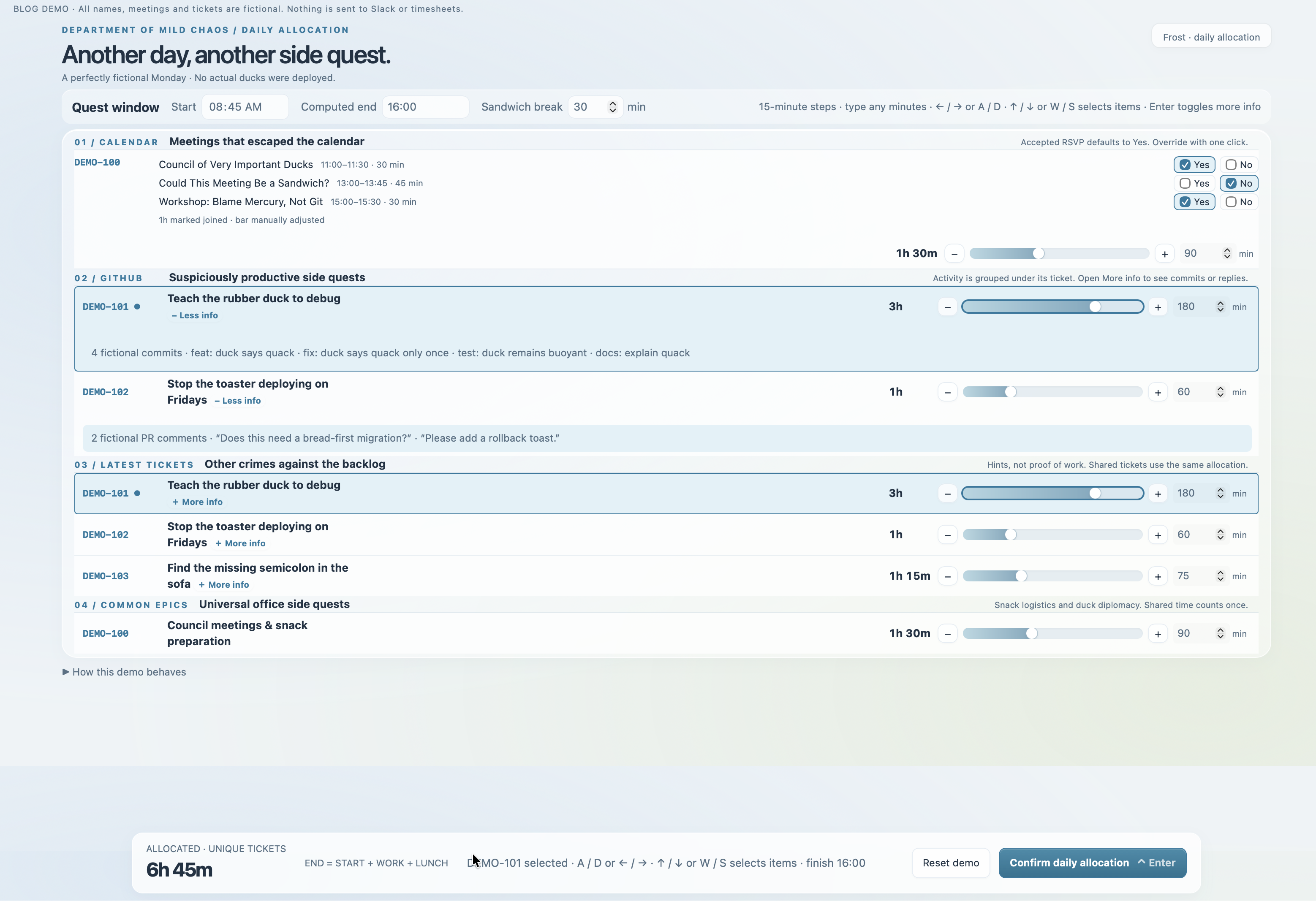
A story to share is the automatic flow for logging hours. The background is that I need to log my working hours into two systems and one of that is in ticket-level - try to imagine the amount of time spent on this. Already having two versions for simplifying - V1 via calling api and V2 via agent skills. My agent is able to map nicely my words and calendar screenshots to the tickets from Jira, but it still require lots typing, info gathering and thinking.
The new idea was inspired from a daily where teammates discussed about some sorts of reminders for PR review. By experimenting solutions, I realized that it is feasible to let the agent read slack messages, figure out PR links out of them and then send messages. One night when lying in bed, suddenly I felt that everything is connected, everything! Last updated tickets and common ones can be retrieved from Jira; my Github commits & PR comments can be fetched; Slack knows my calendar(via Outlook app) and can drop me messages. Then I just need to collect these info and schedule a cronjob to send me those and the only thing I need is to assign the time for it. It took a few iterations and the whole thing was functional, although I did need to fix a bit of this & that afterwards when start using it, which is acceptable given how quickly I set it up.
Here's a example and the productivity boost is terrific.
The path to automation
At the point of writing, I have strong feeling that all texts above are just exposition, including this one. Finally I can put down my conclusions.
To automate X:
- Figure out source of truth/relevant context and how to pass them to your agent.
- Figure out the steps and create the workflow, which can then become an agent skill.
- While skill need to be triggered, the next level is to schedule it at the right time you need via Cronjob.
4. (Yes, here's 4, I foreshadowed this, check the demo image once more)
- Interaction. Well-thought-of interaction makes a huge difference. To simpify operations, I only need to tap WASD/ or ↑↓ ←→ like play FPS.
Not gonna share the details how I came up with this in the end, but if you stop here a bit and think about it. Don't you find it such a brilliant idea?