Dive into building MCP server and good things to know
It has been a great time to explore and get my hands-on to MCP servers. The background is that our team want to know and then estimate if it makes sense to build MCP server to connect with our own API for LLM/agent projects.
I have read quite some articles and blogs but only trying it out yourself then can you really know how exactly it works. It is more complicated than using it, which just requiring copy and paste the configuration json and then magic happens.
First thing to know is the protocol and it is important to choose the right one:
- STDIO is for single-user usage and the sever will run locally.
- HTTP can handle multiple clients simultaneously and can be deployed as an application.
The main difference is not just where the server will be run - from your local machine or deployment on cloud infrastructure, but how the connection between server and client is created:
- For server using STDIO, MCP server, in a form of Python script, will be launched and managed by the client and the connection will be created automatically without any configuration.
- For server using HTTP, MCP server need to start before client(s) try to connect to it.
STDIO is enough in case you aim for testing tools or building a server for personal use. It allows you to focus on developing components like tools and prompts.
However, if your goal is to build a MCP server for production, learning and starting from HTTP would be more useful, as it requires more understandings and configurations to set it up properly, kind of like developing a web framework with similar concepts.
Let us move on with some concrete things I have learned. I choose FastMCP library cause its documentation is so easy to follow. If it happens to be new to you, quickly check out the examples here.
Lifespan
You probably have heard about lifespan, if you have used FastAPI before (link). This idea for MCP server is pretty much the same:
Define logic that should be executed once before the server starts receiving request and when the server is shutting down.

Think about what is needed for your server once it starts, probably loading configuration, initializing a LLM client. And what should be done before the server stops, maybe some cleanup or saving some results. Lifespan can be easily utilized for this purpose:
from mcp.server.fastmcp import Context, FastMCP

@asynccontextmanager
async def lifespan(server: FastMCP):

		# startup code here
		# e.g.
		# llm_client = get_llm_client(...)

    yield

    # shutdown code here
    # e.g.
    # save_results(...)

mcp = FastMCP(name="Demo", lifespan=lifespan) # Add your lifespan
Context
I really like the idea of MCP context, as it provides so many functionalities and how easy to use.
Many examples are there in the link. One thing I feel really useful is the state management, which enables you to define and create session specific objects, which is essential for handling multiple clients.
An example will be out the in the next session. One interesting thing I noticed after reading the source code is that you can manipulate the FastMCP class attribute, here I use lifespan just to showcase one option, although it is not different than lifespan_context.
# FastMCP class does not have attribute state
# aka FastMCP.state is not existed
# But it works for me that FastMCP.state can be created

@asynccontextmanager
async def lifespan(server: FastMCP):
    server.state = dict()
    server.state["status"] = "server started"

    yield
    server.state["status"] = "server stopped"

# After that you can access it via:
@mcp.tool
async def example_tool(context: Context) -> dict:

		status = context.fastmcp.state["status"]
		# ...
    pass
Authentication
I am talking about here is the authentication for MCP server. Other than that, if the process requires user interaction, which need to be implemented in the MCP client side, check out here for examples.
I have tried out the StaticTokenVerifier and JWTVerifier and glad to learn a bit more about JWT. To use this for production, the public_key need to be read by the server.
However, from a security point of view, the might be not be a good idea, as it might be exploited if the key is saved in the MCP server instance anyhow. Plus, as the concept of MCP server is still very new, and it updates very quickly, it might be not as mature as other long standing system.
And for sure I can already imagine our security team won't be happy to this :)
But after testing multiple settings, I change my mind and agree that authentication layer is better to be added, if not, clients can freely connect to the server and send messages to the server, which reminds of DDoS. So why not just cutting the connection at the very beginning?
# ref: https://gofastmcp.com/servers/auth/token-verification#development-and-testing
from fastmcp.server.auth.providers.jwt import JWTVerifier

auth = JWTVerifier(
    public_key=<YOUR_PUBLIC_KEY>,
    issuer="https://your-auth-system.com",
    audience="your-mcp-server"
)
After researching and testing a few approaches, I make it in this way so that the Bearer token will be sent to a authentication endpoint once a tools/call request is received and a lru_cache is added to each user session to optimize the process:
from fastmcp import Context, FastMCP
from async_lru import alru_cache

@mcp.tool
async def example_tool(context: Context) -> dict:
    _ = await _token_authentication(context)
    return ...

async def _token_authentication(context: Context) -> tuple[dict[str, Any], str]:
    auth_token = await get_auth_token(context)
    _ = await call_auth_endpoint(context.session_id, auth_token)
    return ...

async def get_auth_token(context: Context) -> str:
    # Extract request headers
    request = context.request_context.request
    if request:
        # Retrieve the Authorization header
        auth_token = request.headers.get("Authorization")
    else:
        raise RuntimeError("No request found in context, values should be added to request headers")

@alru_cache(maxsize=32, ttl=3600)
async def call_auth_endpoint(session_id, auth_token):
	# call the auth endpoint and cache the result
	pass
You can see that HTTP header, auth_token and session_id can be read from MCP Context. With those session specific information, you can design whatever you want.
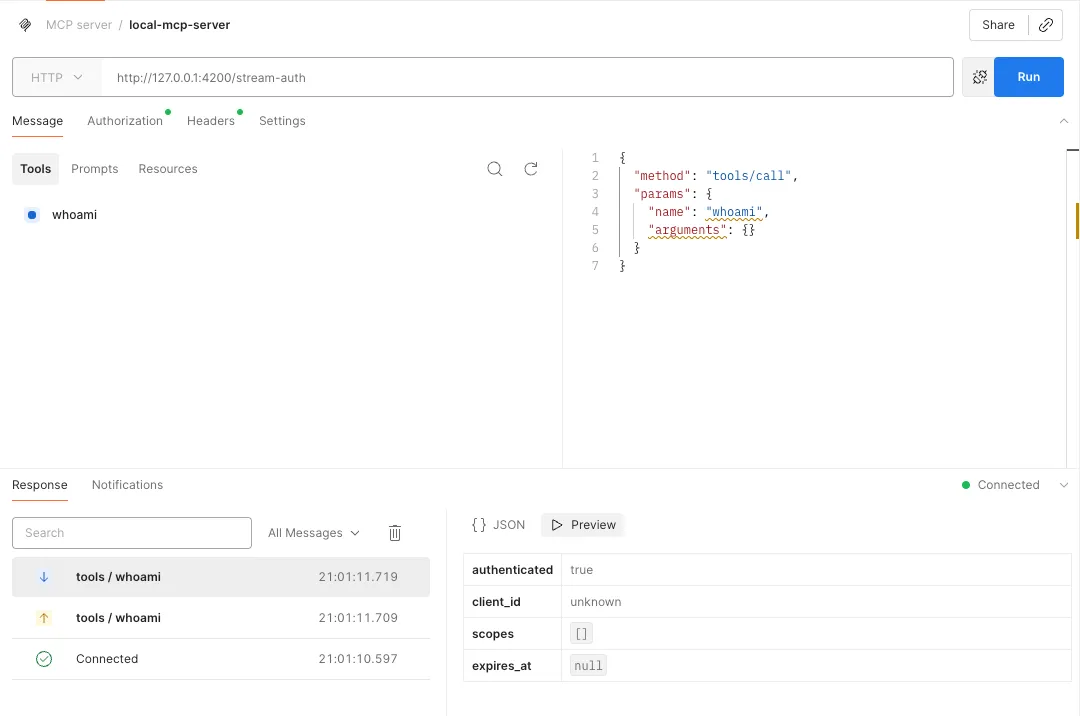
Test your server
One last but not least thing I want to share, is the tool I use to test MCP server. I don't really like fastmcp dev option as the interface is not that easy to follow. Instead, I prefer Postman, especially I desire for HTTP transport. I can easily see all the messages and check previous ones anytime by one click.